Budget owner
This page provides use cases and example prompts typical for a budget owner.
To make the two written parts of Copilot prompts more explicit, the example prompts below show the Task bolded and the Scope italicized.
Note: Limited Language Models (LLMs) are non-deterministic, therefore the answers returned by the agent will vary; also, the answers are affected by your model structure.
Understand cost of revenue
You are VP of Operations and you want to understand the cost of revenue across regions so that you know where to cut costs.
-
From the Copilot drop-down you select Reporting Agent | Revenue.
-
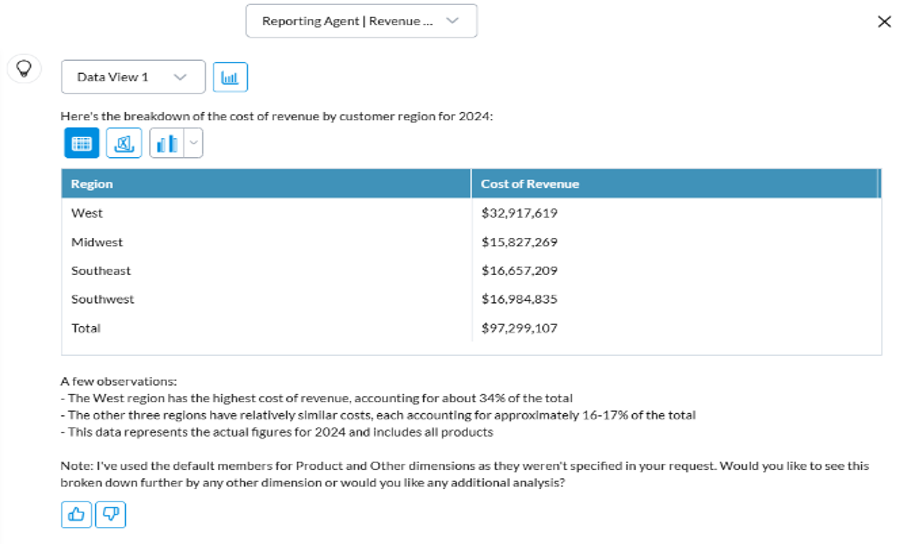
You prompt: What is the cost of revenue by customer for 2024?
Reporting Agent responds:
-
You click Analyze to see the query:
-
Account: Cost of Revenue
-
Customer: Total Region.PlusChildren
-
Other: ALL (default)
-
Product: ALL (default)
-
Time: 2024
-
Time Perspective: BASE (default)
-
Version: Actual (default)
-
-
This looks correct, so you ask a follow-up question:
Can you compare this to 2025?
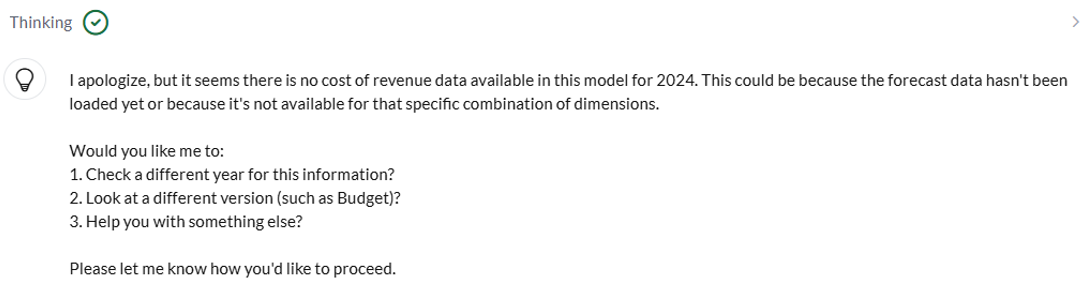
Reporting Agent doesn't see any data in actuals and so it asks a follow-up question:
-
You reply:
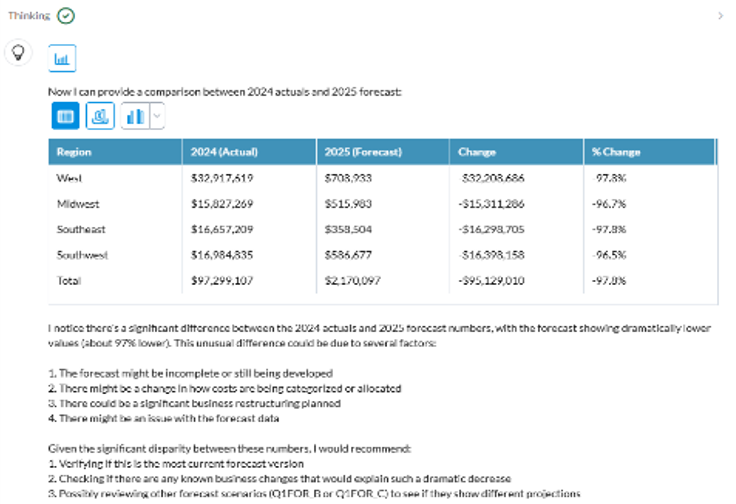
Please look at the Forecast version.
Reporting Agent responds:
-
You reply:
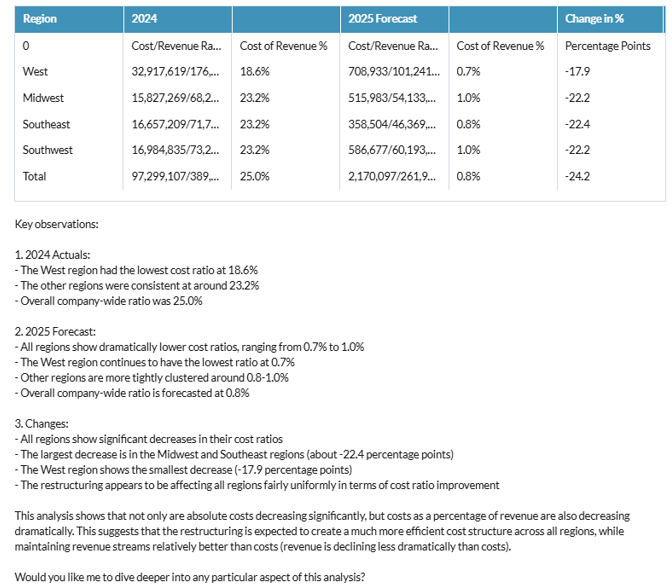
Yes, we can do a big restructuring and so this drop is expected. Can you calculate Cost of Revenue as a percentage of Gross Revenue now? I want to see if that has changed between years and regions.
Reporting Agent responds:
-
This is what you needed. You click Download to Excel and continue your analysis in Excel.
Add employees
You are CTO and you want to model an increase in payroll costs to $3M for 2025. You also want to know whether you can add employees to your personnel plan.
-
From the Copilot drop-down you select Reporting Agent | Personnel.
-
You prompt: What are the payroll costs for 2025? Use the budget version.
Reporting Agent responds: $2.5M.
Now you know you can add an extra $500K to your budget.
-
You click Analyze to see the query:
-
Account: Payroll Costs
-
Allocation: ALL (default)
-
Department: ALL (default)
-
Employee: ALL (default)
-
Entity: ALL (default)
-
Time: 2025
-
Time Perspective: BASE (default)
-
Version: Budget
-
-
This looks correct, so you select Budgeting Agent | DP | Personnel.
-
You prompt: What is the average Sr. Engineer salary?
Budgeting Agent responds: $100K .
-
You prompt: Please add 5 Sr. Engineers. with a salary of 100K. Copy the rest of the attributes from Dottie Smith.
The Budgeting Agent shows what will be changed.
-
You accept and the updates are made in the Personnel Budget.
Check your budget
You are CTO and you want to understand how close you are to going over budget.
-
From the Copilot drop-down you select Reporting Agent | Finance.
-
You prompt: Can you compare the R&D department Gross Margin across 3 versions: Actual, Budget, and Forecast.
Reporting Agent responds that it needs to know for what time period.
-
You prompt: For 2025.
The Reporting Agent responds with a chart comparing the three versions.
-
You click the Chart button and review the bar chart.
Update OPEX data
You are the head of Marketing and you want to update your OPEX budget for the 2026 budgeting season after receiving a template pre-filled with 10 + 2 forecast data. You open the template and then open Copilot to help you adjust the data.
-
From the Copilot drop-down you select Budgeting Agent | Finance.
-
You prompt: Update the web presence account for the product marketing department and the entity Stark Industries in April 2025 and June 2025 to be 50k. Use the Budget version.
Reporting Agent asks how you would like to spread the data.
-
You prompt: Evenly.
Budgeting Agent shows what will be updated.
-
You confirm the updates.
-
You refresh the page and see that the numbers have been updated in a template.
Update revenue forecast
You are the VP of Sales, it’s half-way through your fiscal year, and you have updated your sales process. Now you want to make a more aggressive revenue forecast. You open your revenue template and open Copilot.
-
From the Copilot drop-down you select Budgeting Agent | Revenue.
-
You prompt: Can you increase Gross Revenue in the 6+6 Forecast version to 10% higher for the last half of the year?
Budgeting Agent asks how you would like to spread over the months and the members.
-
You prompt: Based on historical and evenly.
Budgeting Agent shows what will be updated.
-
You confirm the updates.
-
You refresh the page and see that the numbers have been updated in a template.